One tool.
All of your day.
Ein Werkzeug.
Dein ganzer Tag.

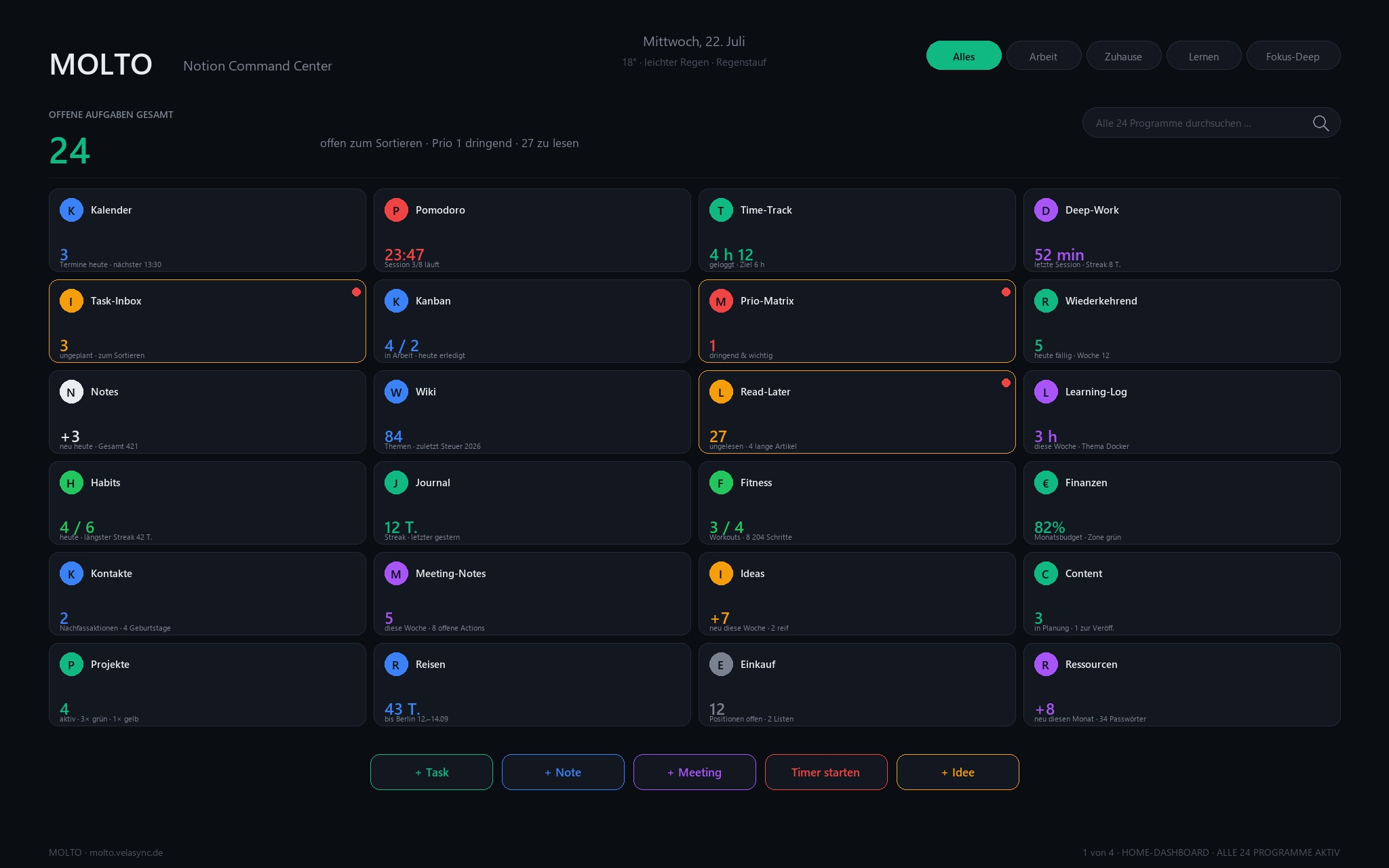
MOLTO is a Notion Command Center. One screen. 24 programs. Five focus modes. The Swiss Army Knife you built once and use every hour. MOLTO ist eine Notion-Kommandozentrale. Ein Bildschirm. 24 Programme. Fünf Fokus-Modi. Das Schweizer Taschenmesser, das du einmal einrichtest und stündlich nutzt.

Small word. Many things.
MOLTO Home Dashboard — 24 programs on one screen
Why MOLTOWarum MOLTO

Your Notion is a mess.
MOLTO makes it a screen.
Dein Notion ist ein Chaos.
MOLTO macht daraus einen Screen.

You bought three life-OS templates and used none. That's not your fault — they were built to impress, not to be used. MOLTO is built to be opened forty times a day. Du hast drei Life-OS-Templates gekauft und keins genutzt. Das ist nicht deine Schuld — sie wurden gebaut, um zu beeindrucken, nicht um benutzt zu werden. MOLTO ist gebaut, um vierzig Mal am Tag geöffnet zu werden.

01 · The home screenDer Home-Screen

Like an iPhone,
for your day.
Wie ein iPhone,
für deinen Tag.

24 widget tiles in a 6×4 grid. Each one is a live number: tasks open, minutes deep-worked, next appointment, streak days. One click opens the full program. 24 Widget-Kacheln in einem 6×4-Raster. Jede zeigt eine Live-Zahl: offene Tasks, Deep-Work-Minuten, nächster Termin, Streak-Tage. Ein Klick öffnet das volle Programm.

Home Dashboard
02 · Focus modesFokus-Modi

The screen changes with you.Der Screen ändert sich mit dir.

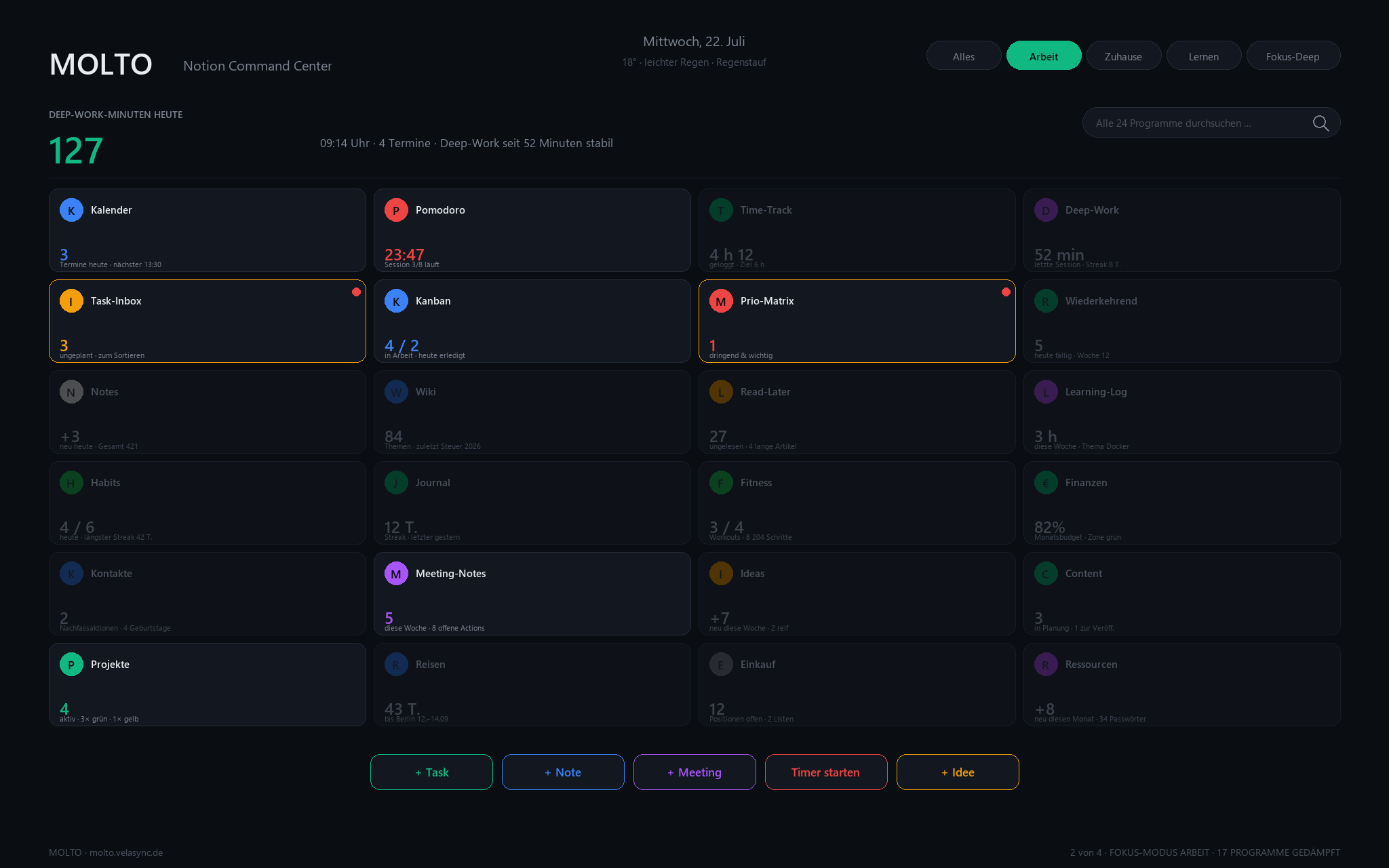
Work mode dims 17 tiles and pushes Pomodoro forward. Home mode brings the shopping list, habits, and finances to the front. Deep mode leaves you with the timer and nothing else. Der Arbeits-Modus dimmt 17 Kacheln und stellt den Pomodoro-Timer nach vorne. Der Zuhause-Modus bringt Einkaufsliste, Gewohnheiten und Finanzen in den Fokus. Deep-Modus lässt dich mit dem Timer allein.

Focus Mode: Work
03 · Task commandTask-Kommando

Click a tile.
The full program opens.
Kachel klicken.
Volles Programm.

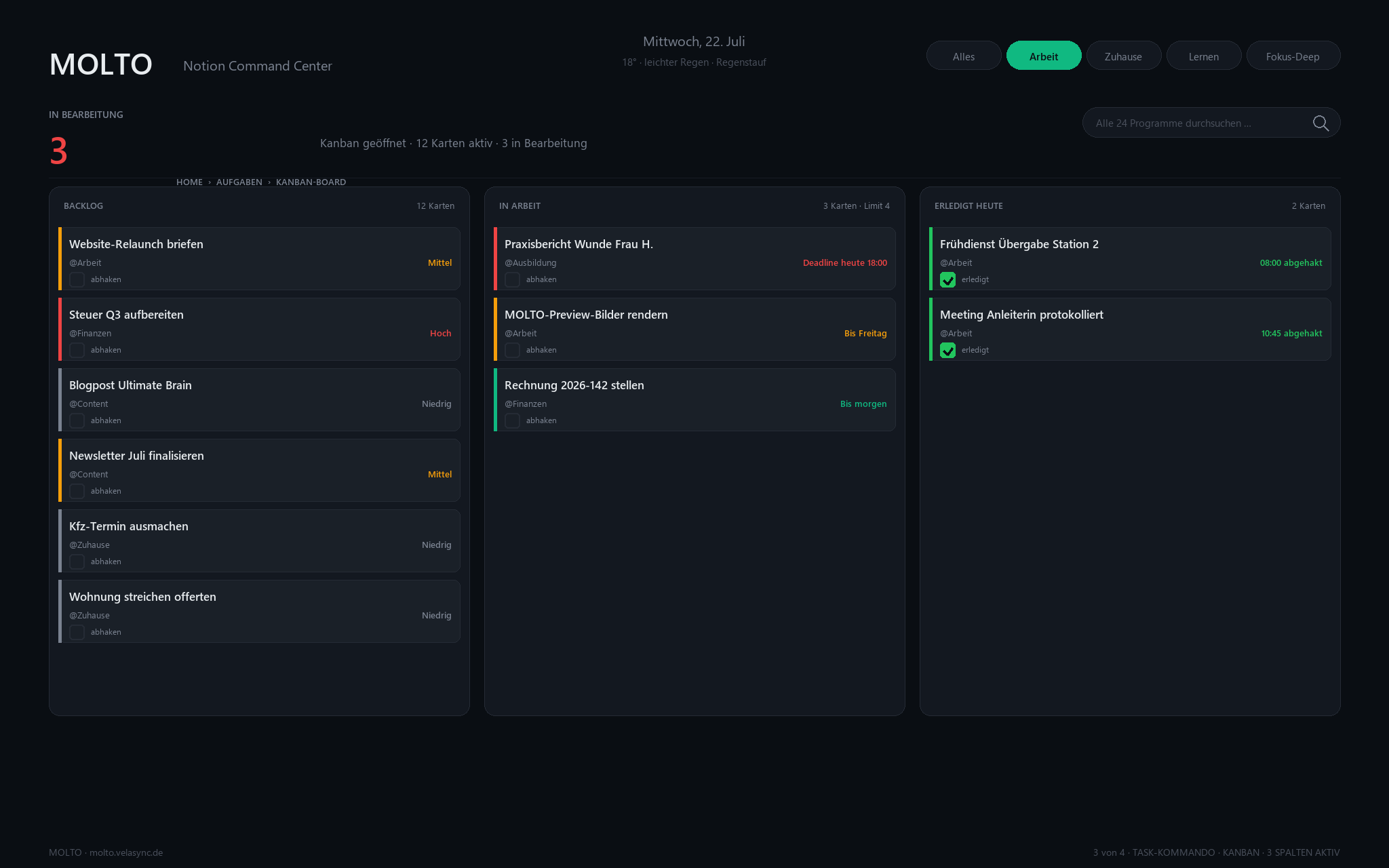
Kanban board, Priority Matrix, Task Inbox — three columns, drag-and-drop, deadline colors. You never leave Notion, you never leave the dashboard flow. Kanban-Board, Prio-Matrix, Task-Inbox — drei Spalten, Drag-and-Drop, Deadline-Farben. Du verlässt weder Notion noch den Dashboard-Fluss.

Task Kanban
04 · Knowledge centerWissens-Zentrale

Notes, Wiki, Read-Later
side by side.
Notizen, Wiki, Read-Later
nebeneinander.

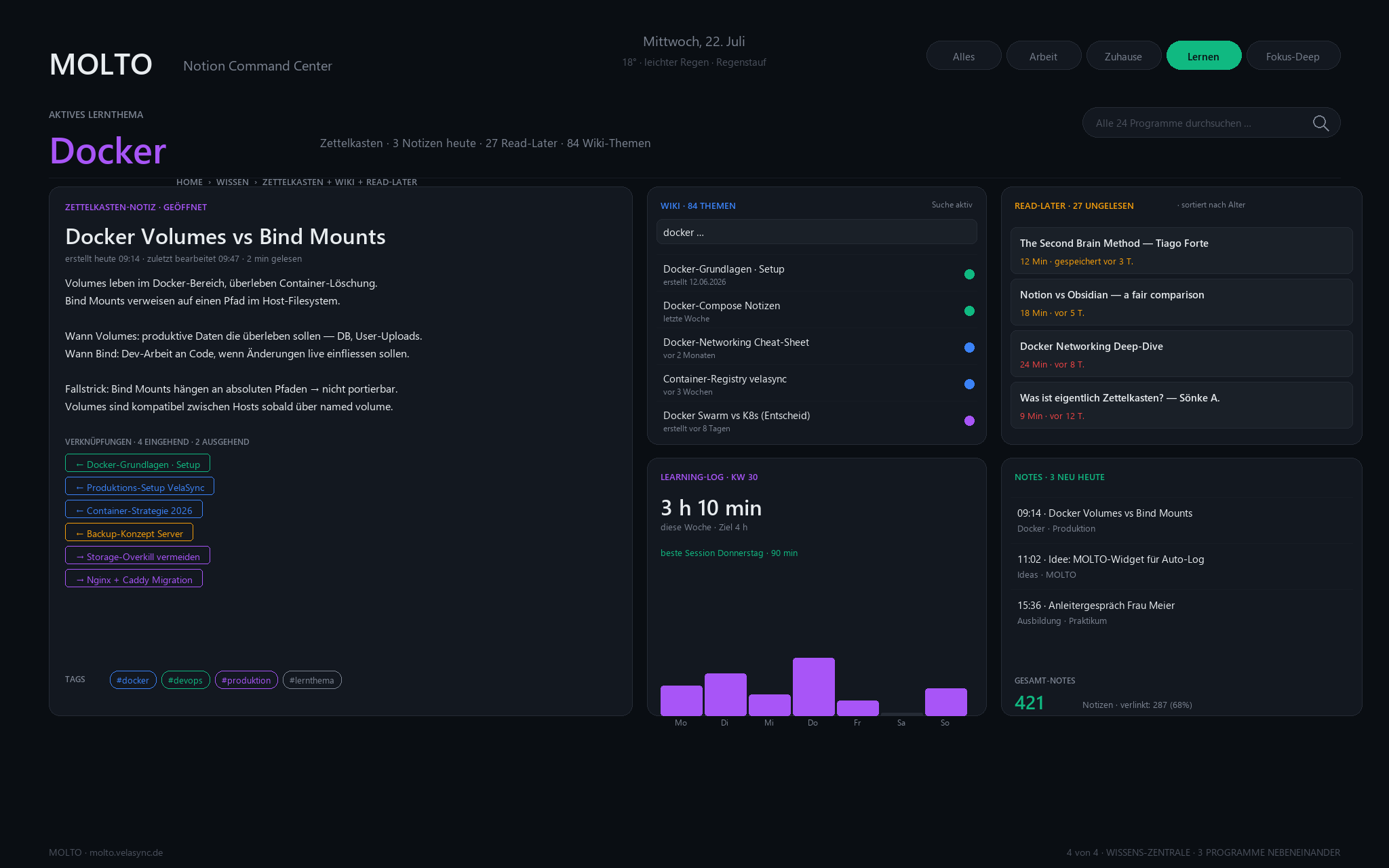
Zettelkasten-style notes with backlinks. Searchable wiki. Read-Later queue sorted by age. Learning-log per week. All on one screen, no tab-switching. Zettelkasten-Notizen mit Rückverknüpfungen. Durchsuchbares Wiki. Read-Later-Warteschlange nach Alter sortiert. Wöchentlicher Lernlog. Alles auf einem Screen, kein Tab-Wechsel.
Knowledge Center
24 programs24 Programme

The full toolkit.Der volle Werkzeugkasten.

Six categories. Four programs each. Every one delivers a live number to the home screen. Sechs Kategorien. Vier Programme je Kategorie. Jedes liefert eine Live-Zahl an den Home-Screen.

K
Kalender
Time
P
Pomodoro
Time
T
Time-Track
Time
D
Deep-Work
Time
I
Task-Inbox
Tasks
K
Kanban
Tasks
M
Prio-Matrix
Tasks
R
Recurring
Tasks
N
Notes
Knowledge
W
Wiki
Knowledge
L
Read-Later
Knowledge
L
Learning-Log
Knowledge
H
Habits
Life
J
Journal
Life
F
Fitness
Life
Finance
Life
K
Contacts
People
M
Meeting-Notes
People
I
Ideas
People
C
Content
People
P
Projects
Resources
R
Travel
Resources
E
Shopping
Resources
R
Resources
Resources
Focus modesFokus-Modi

Five ways to see.Fünf Blickwinkel.

One tap. The right programs come forward. The rest fades away. Ein Tipp. Die richtigen Programme kommen nach vorn. Der Rest verblasst.

All
Morning coffeeMorgenkaffee
Work
9-to-5 focus9-bis-17-Fokus
Home
Evening + weekendAbend + Wochenende
Learn
Exam + trainingPrüfung + Fortbildung
Deep
Timer, nothing elseTimer, sonst nichts
How MOLTO comparesMOLTO im Vergleich

Less setup. More screen.Weniger Setup. Mehr Screen.

What mattersWorauf es ankommt MOLTO Ultimate Brain Second Brain
One-screen home dashboardHome-Dashboard auf einem Screen
Focus modes (5)Fokus-Modi (5)
Setup timeSetup-Zeit60 sec3–6 h2–4 h
Notion AI requiredNotion AI nötigNoOptionalNo
German + English out of the boxDE + EN ab WerkEN onlyEN only
PricePreis79 €$129$49
PricingPreise

Once. Yours. Forever.Einmal. Deins. Für immer.

Pick your ladder. Lifetime access, free updates, 14-day money-back. Wähle deine Stufe. Lebenslanger Zugriff, kostenlose Updates, 14-Tage-Geld-zurück.

MOLTO Standard

79 €
one-timeeinmalig
  • Home Dashboard (24 tiles)Home-Dashboard (24 Kacheln)
  • All 24 programsAlle 24 Programme
  • 14 days of sample data14 Tage Beispieldaten
  • DE + EN languageDE + EN Sprache
  • Free lifetime updatesKostenlose Lifetime-Updates
Buy StandardStandard kaufen
Most popularBeliebteste

MOLTO Premium

129 €
one-timeeinmalig
  • Everything in StandardAlles aus Standard
  • 5 Focus Modes5 Fokus-Modi
  • 12 additional programs12 Zusatz-Programme
  • Monthly update packMonatliches Update-Paket
  • Private community accessCommunity-Zugang privat
Buy PremiumPremium kaufen

MOLTO + OMNI Bundle

179 €
save 29 €29 € sparen
  • MOLTO Premium (full)MOLTO Premium (voll)
  • OMNI OS 8-cockpit templateOMNI OS 8-Cockpit-Template
  • Cross-linked setup guideVerknüpfter Setup-Guide
  • 3 languages: DE + EN + ES3 Sprachen: DE + EN + ES
  • Priority supportPriority-Support
Buy BundleBundle kaufen

Secure payment via Mollie · SEPA, Card, PayPal, Klarna Sichere Zahlung via Mollie · SEPA, Karte, PayPal, Klarna

FAQ

Answered.Beantwortet.

Do I need a paid Notion plan?Brauche ich einen bezahlten Notion-Plan?

No. MOLTO runs on Free. No Notion AI required, no Business plan. Nein. MOLTO läuft auf Free. Kein Notion AI nötig, kein Business-Plan.

How long does setup take?Wie lange dauert das Setup?

60 seconds. You duplicate the template into your Notion, and the dashboard is live with sample data. Rename to your life in the following 20 minutes. 60 Sekunden. Template in dein Notion duplizieren, Dashboard ist live mit Beispieldaten. In den nächsten 20 Minuten passt du es auf dein Leben an.

Can I use it on iPhone / iPad?Funktioniert es auf iPhone / iPad?

Yes. The 6×4 grid gracefully collapses to 3-column on tablet and 2-column on phone. All widgets stay clickable. Ja. Das 6×4-Raster fällt auf 3 Spalten (Tablet) und 2 Spalten (Handy) zusammen. Alle Widgets bleiben klickbar.

Is it a real template — or just a landing?Ist es ein echtes Template — oder nur eine Landing?

A real template. 24 sub-pages, ~32 Notion databases, rollup formulas that feed live numbers to the dashboard. Buttons for quick capture. All ready-to-duplicate. Ein echtes Template. 24 Sub-Pages, ~32 Notion-Datenbanken, Rollup-Formeln füttern Live-Zahlen ans Dashboard. Buttons für Quick-Capture. Alles duplizierbar.

What if I already have 40 templates?Was, wenn ich schon 40 Templates habe?

You don't need a 41st. You need one that replaces the other 40 — that's MOLTO. Move your data over, delete the rest, and stop template-hopping forever. Du brauchst kein 41. Du brauchst eins, das die anderen 40 ersetzt — das ist MOLTO. Daten übernehmen, den Rest löschen, Template-Hopping für immer beenden.

Refunds?Rückgabe?

14 days, no questions. Reply to the purchase email, you get your money back. 14 Tage, ohne Fragen. Auf die Kauf-E-Mail antworten, Geld zurück.

Set your day.Setze deinen Tag.

One tool. All of your day.Ein Werkzeug. Dein ganzer Tag.

Small word. Many things.